Email unique promo codes
Use a promotion's Issuances tab to generate unique codes and email them to specific recipients. Each recipient gets their own codes. You need permission to manage promotions and a public mailing address saved for your organization.
Prepare the offer and mailing address
Create the promotion with Add or issue codes later, following Create an event promo code for its event, name, and discount settings. Make the promotion Active when the offer is ready to use.
Open Edit Promo → Issuances. If Public mailing address required appears, New Issuance is unavailable. Select Open organization settings, complete the public mailing address, and select Save details. Return to the promotion afterward. See Update your organization's public details.
The mailing address is included in the message, so use the address your organization intends recipients to see.
Send the codes
- In Issuances, select New Issuance.
- Enter Recipients (one per line or comma-separated). Correct any invalid email addresses before continuing.
- Set Codes per Recipient. For example, two recipients with
2codes each creates four distinct codes. - Optionally enter Code Prefix (optional), such as
PARTNER. - Set Max Redemptions for each Code, Max Tickets each Code can Discount (or Max Passes each Code can Discount), and Max Discount for each Code ($) as needed. These limits apply to each generated code.
- Review the recipients and limits, then select Send Codes.
- Wait for Issuance batch created.
This action creates new codes and sends email. To create codes without emailing them, use Add Codes instead.
Check the delivery records
Reopen the promotion's Issuances tab and check the summary and recipient rows. Four codes sent to two recipients appear as 4 total · 4 sent. Each recipient's message contains their own assigned codes, the offer details, and the organization's mailing address.
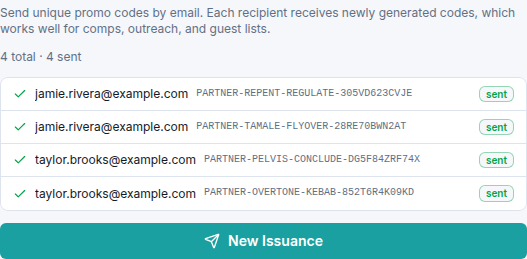
Creating a batch and completing delivery are separate steps. If records remain pending or show a failure, review the displayed status before creating another batch. If a recipient cannot find a sent message, ask them to check spam and confirm the address in the delivery record.
Contact support with the promotion name, recipient address, and displayed status if delivery remains unresolved. To change an existing code's availability or limits, see Edit, pause, or retire one promo code.