Create a collect-later order
Use Collect Later when a customer needs a booking before paying. You need access to the organization's box office and order payment actions. Have the customer's name and correct email address ready.
Create the booking
- Open Box Office, choose the Event and Event Time, then select Continue.
- Choose the ticket quantities. On a phone, select Review Order.
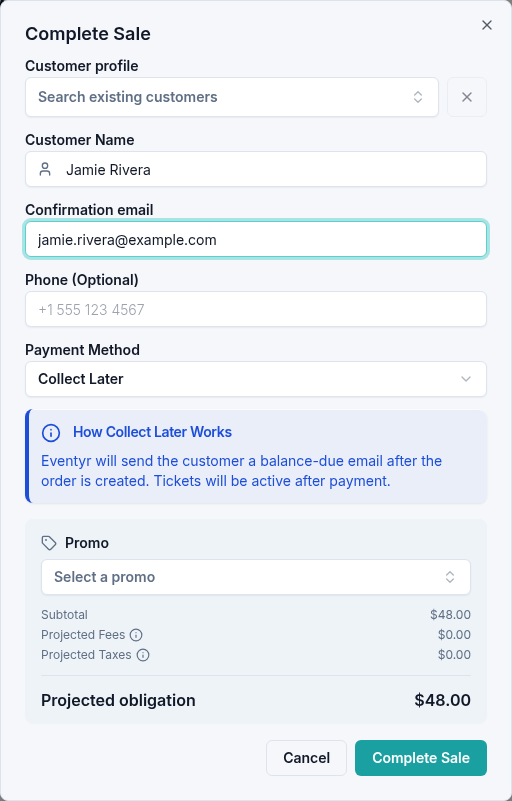
- Select Collect Later (Later on a phone).
- In Complete Sale, use Create or find a customer to select an existing customer or choose Enter new customer information. Enter the customer's name and confirmation email; both are required for this option.
- Check the tickets and total, then select Complete Sale.
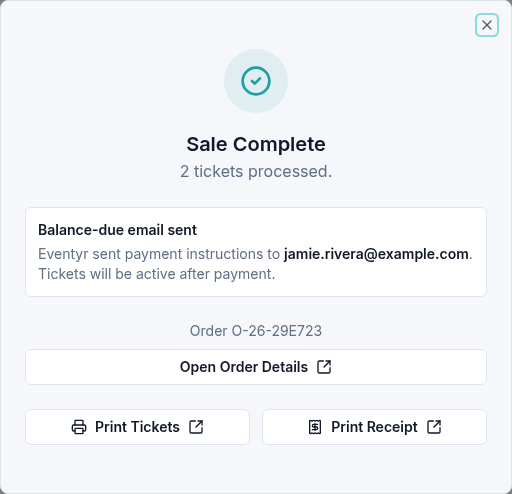
Wait for Sale Complete and Balance-due email sent. Eventyr sends payment instructions to the email you entered. The confirmation states that tickets will be active after payment. Keep the order reference to find the booking again.
To send new instructions or invalidate an old link, manage the payment links from the order.
Follow up on payment
When the customer is ready, use Settling a collect-later order to settle this existing order. Do not create a second sale for the same tickets.
If the email does not arrive, confirm the address and ask the customer to check their spam folder. You can resend instructions from the order.
Check in attendees
This booking still has a balance due. Tickets become active after payment; creating the booking does not check anyone in. Once the balance is settled, use the attendee check-in screen when the customer arrives.
If a check-in update fails, check the current ticket status before trying again. Contact Us with the event time, order reference, and message if you need help.