Reserve seats for box-office sales
Use a box-office reservation when staff should check a guest's circumstances before selling a particular seat. You need permission to manage the event's seat blocks. The person completing the sale needs box-office access.
Reserve the seats
- Open the event's Event Times and the actions menu for the event time.
- Choose Seat Blocks & Reservations and select the seats on the map.
- Enter a Reason that staff will recognize. Use Notes for instructions, such as who the seats are being held for and who may approve their sale.
- Turn on Allow box office sales.
- Leave Allow customer sales with an access code off if these seats should be sold only by staff.
- Select Save Seat Block / Reservation.
Online visitors see the seats as restricted. Selecting one shows This seat is reserved for box office sales. and does not add it to their booking.
If nobody should sell the seats, leave both sale options off instead; see Block and release seats. For an online guest code, see Reserve seats with an access code.
Complete the sale at the box office
- Open Box Office for the correct event and event time.
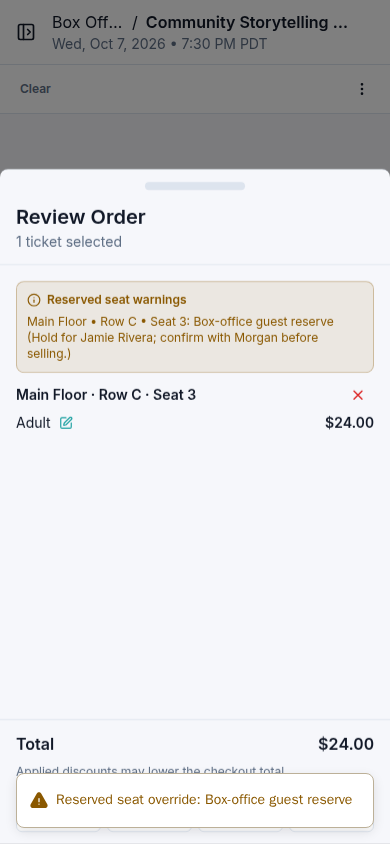
- Select the reserved seat. Read Reserved seat warnings, including the reason and notes. On a phone, select Review Order to view the summary.
- Confirm that you have the organizer's approval described in those notes.
- Complete the appropriate payment flow. For cash, choose Cash, enter the customer details and cash tendered, then select Complete Sale.
- Wait for Sale Complete and check the issued ticket.
A hard-blocked seat remains unavailable to box-office staff. If it should be sold, ask someone with permission to review its block. Do not substitute a different seat without checking with the customer.
See Sell tickets for cash for the full payment and receipt steps. To make an unsold reserved seat generally available again, release its block.