Change your appearance settings
Choose the appearance that is most comfortable when using your organizer workspace. You can switch it again at any time.
- Open the user menu at the bottom of the sidebar. On a phone, first open the sidebar from the page header.
- Select Theme.
- Choose Light, Dark, or System.
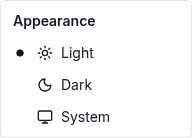
The choice takes effect immediately and remains after you reload the page. There is no separate Save button.
- Light keeps the workspace light even when your device uses dark mode.
- Dark keeps the workspace dark.
- System follows your device's light or dark appearance. It can change when your device preference changes.
If the appearance changes unexpectedly, check whether System is selected. Choose Light or Dark if you want a fixed appearance in this browser. If a choice does not take effect, reload and check Theme again; if the problem continues, contact support with your device and browser details.