Share access to a pass
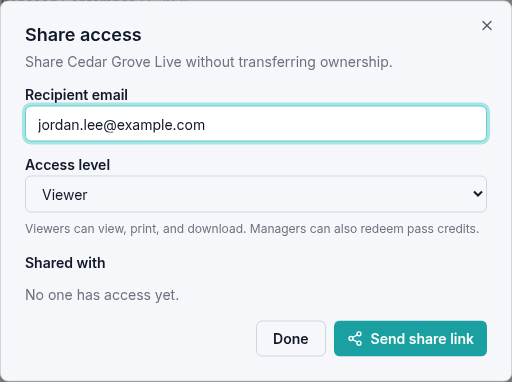
You can give someone access to your pass while keeping ownership. Choose the access level based on what you want them to do.
| Access level | What the recipient can do |
|---|---|
| Viewer | View the shared pass and print or download its available tickets. |
| Manager | View the shared pass and also redeem its credits. |
Invite a viewer or manager
- Open your wallet using the email that owns the pass.
- Select Passes and find the pass.
- Select Actions in the pass header (⋮ on smaller screens), then Share to open Share access.
- Enter the person's email in Recipient email.
- Choose Viewer or Manager under Access level.
- Select Send share link. Check the email and role under Shared with, then select Done.
A manager uses the same pass credits as the owner. Their redemption appears under Your Tickets on the pass and uses its available credits.
Use a pass shared with you
Open the emailed share link, or sign in to the organizer's My Wallet with the invited email address and select Shared. The pass identifies its owner with Shared from.
- A Viewer sees a view-only message. When the pass has redeemed tickets, select Actions in the pass header for Download all or Print all, or use a ticket's Actions menu for Download or Print.
- A Manager can also choose an event time and redeem available credits.
You do not need to have made your own purchase from the organizer to open a shared pass or download its available tickets. Sharing remains controlled by the owner; recipients do not have a Share action.
Remove someone's access
- Open your own Passes tab and select Actions in the pass header, then Share to see everyone with access.
- Under Shared with, select Revoke beside the person's email.
- Check that the person is removed from the list, then select Done.
The pass disappears from that person's Shared wallet. This applies to both viewers and managers. If you are concerned about copies of tickets they may already have saved, contact the organizer.
If you cannot redeem
If the pass says it is view-only, ask the owner about manager access. Also check that you signed in with the invited email address. For questions about which events your pass covers, contact the organizer.